

Introduction
Images are the quiet workhorse of video. Every explainer needs a hero shot, every product video needs packshots, and every presentation needs illustrations that leave room for a title. AI image generators now produce all of these in seconds, but they're far from equal, and the leaderboards don't tell you which one suits your kind of work.
In the past few months a new generation of image models has arrived: Google's Nano Banana 2.1, OpenAI's GPT Image 2.5, Meta's Muse Image, xAI's Grok Imagine Image 2.0, ByteDance's Seedream 5.0 and Alibaba's Qwen Image 3.0. Several of them also edit existing images from a plain-language instruction.
So we tested them the way we test video models: the same prompts for every model, one take each, no cherry-picking. We ran three briefs that reflect how images are actually used in videos and slides, then one editing task that turns a sunny beach photo into a night scene with a different product.
The Models
- Google Nano Banana 2.1. Google's latest image model, built on Gemini, with generation and editing from up to 14 reference images. Fourth on Artificial Analysis's text-to-image leaderboard at the time of testing.
- OpenAI GPT Image 2.5 (Sunburst). The model that tops the same leaderboard at its maximum quality setting. We tested it at medium quality, a far more practical setting for everyday use.
- Meta Muse Image. Meta's new image model, eighth on the leaderboard and by far the cheapest model in this comparison.
- xAI Grok Imagine Image 2.0. Sixth on the leaderboard, and the most expensive model we tested at its default settings.
- ByteDance Seedream 5.0 Flash and Seedream v4. The newest fast Seedream and the version many apps still run on, so you can see how much a year of progress buys.
- Alibaba Qwen Image 3.0. A popular, lower-cost model, ranked eighteenth on the leaderboard.
Methodology
Each test used the exact same prompt for every model: no rewording, no retries, no picking the best of several attempts. Every image was generated in 16:9, at each model's roughly-2K setting where it had one. For every image we recorded:
- Relative cost. Rather than quoting prices, which vary between providers and change often, we show each model's cost relative to the cheapest model in the test (1×). A model marked 5× costs about five times as much per image.
- Output resolution, which matters if the image will fill a 1080p or 4K video frame.
- Generation time, from submission to a finished image.
- Quality score out of 10, for realism, prompt adherence, text accuracy and how usable the image is as delivered.
The usual caveat applies: one attempt per prompt is a snapshot, and any model can have a good or bad day. Treat each result as a data point, not a final verdict.
Test 1: A Photoreal Beer Ad
Product photography is the classic use for AI images in marketing, and it's harder than it looks. The model has to get glass, condensation and backlight right, and invent a believable label.
The prompt:
Commercial product photograph: an ice-cold glass bottle of Mexican lager with condensation droplets on a weathered wooden bar top at a beach bar, a lime wedge in the neck, the ocean and palm trees softly blurred behind, warm golden-hour sunlight, shallow depth of field, crisp and premium advertising look.
Nano Banana 2.1 — 4.9× cost | 2752×1536 | 48s | ⭐ 9/10
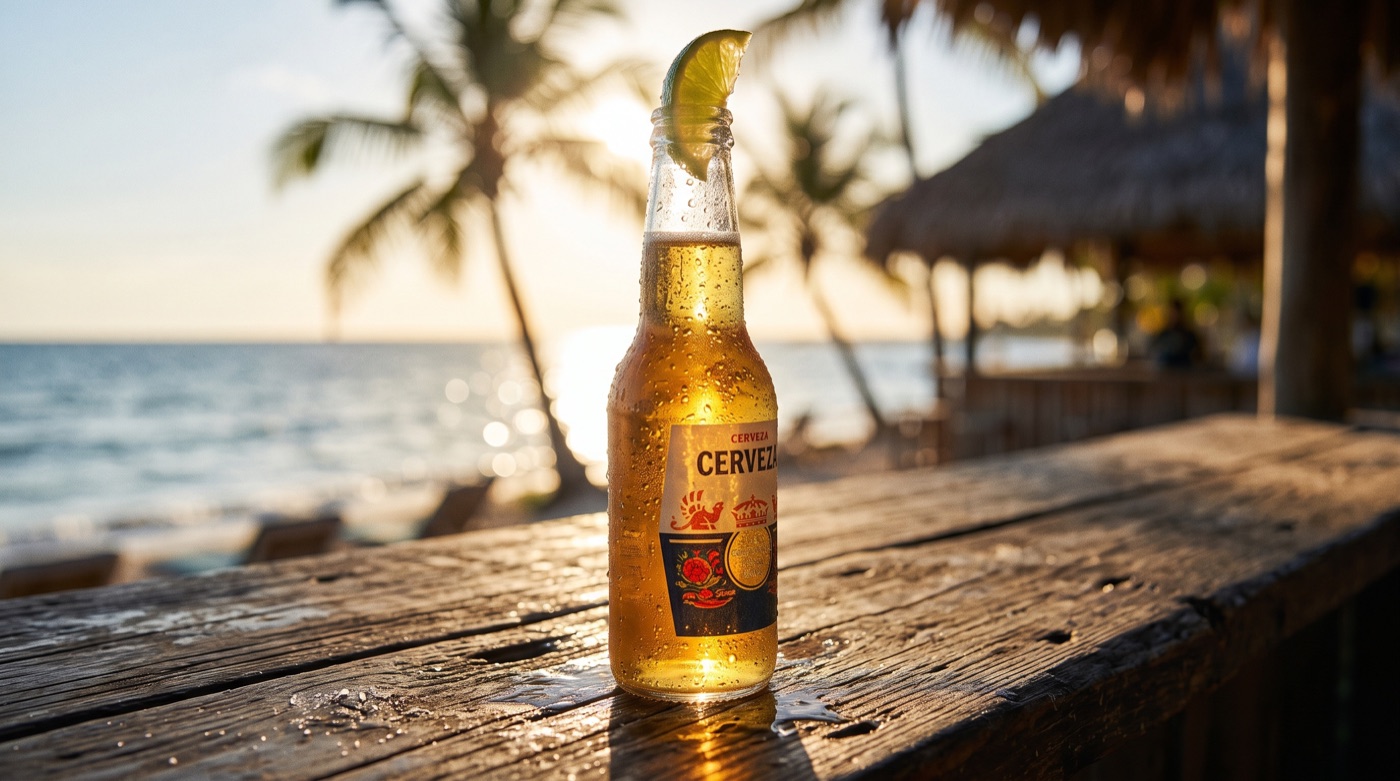
The most cinematic shot in the test. The sun sits behind the bottle and lights up the beer, the wet bar top reflects it convincingly, and the invented "Cerveza" label has the look of a real craft brand. This is the one we'd hand to a client as-is.
Meta Muse Image — 1× cost | 2048×1152 | 19s | ⭐ 9/10
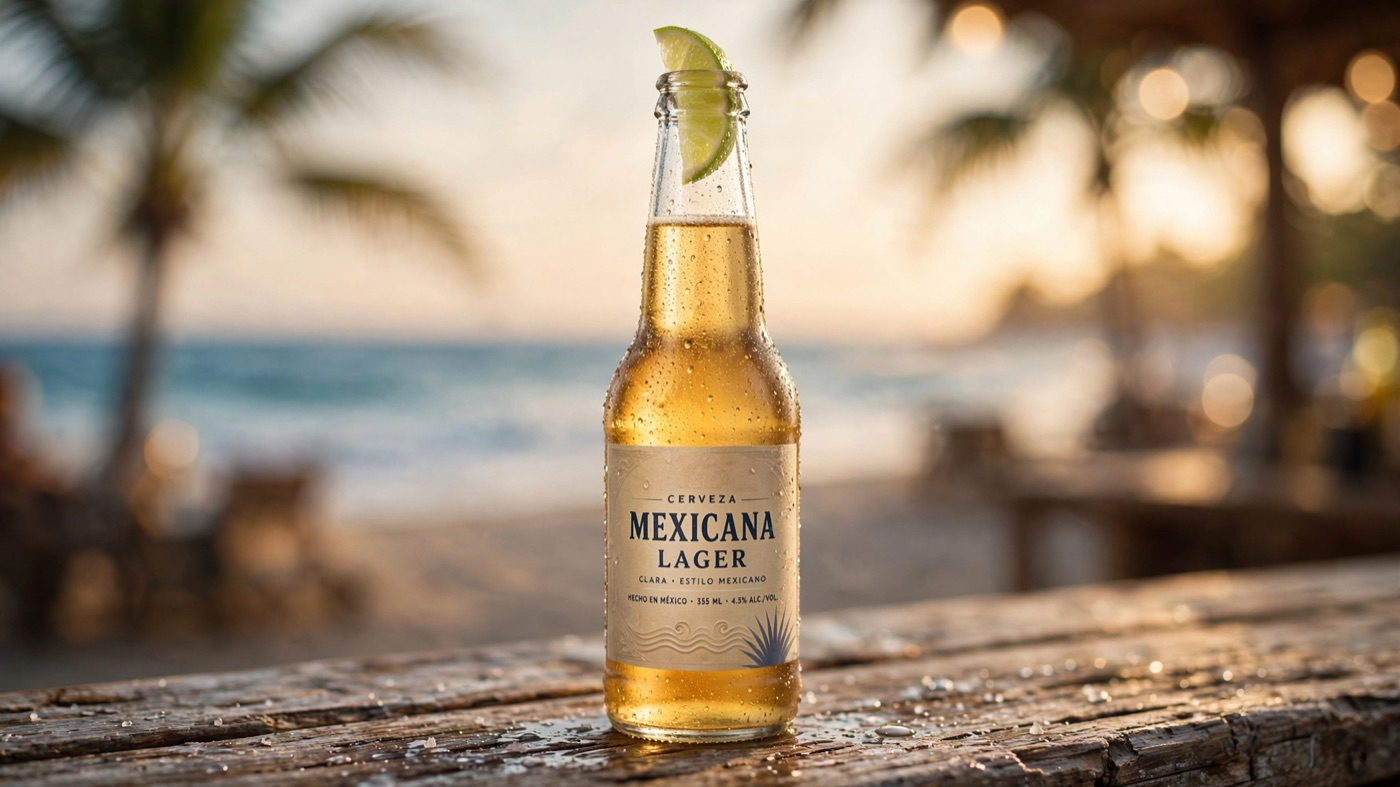
A polished advertising image at the lowest cost in the test. The "Mexicana Lager" label is clean and legible, the droplets look natural, and the beach falls away into soft, warm bokeh exactly as the prompt asked. It's a touch more catalogue than cinematic, but it's ready to use.
Seedream 5.0 Flash — 2.2× cost | 2730×1536 | 19s | ⭐ 7.5/10
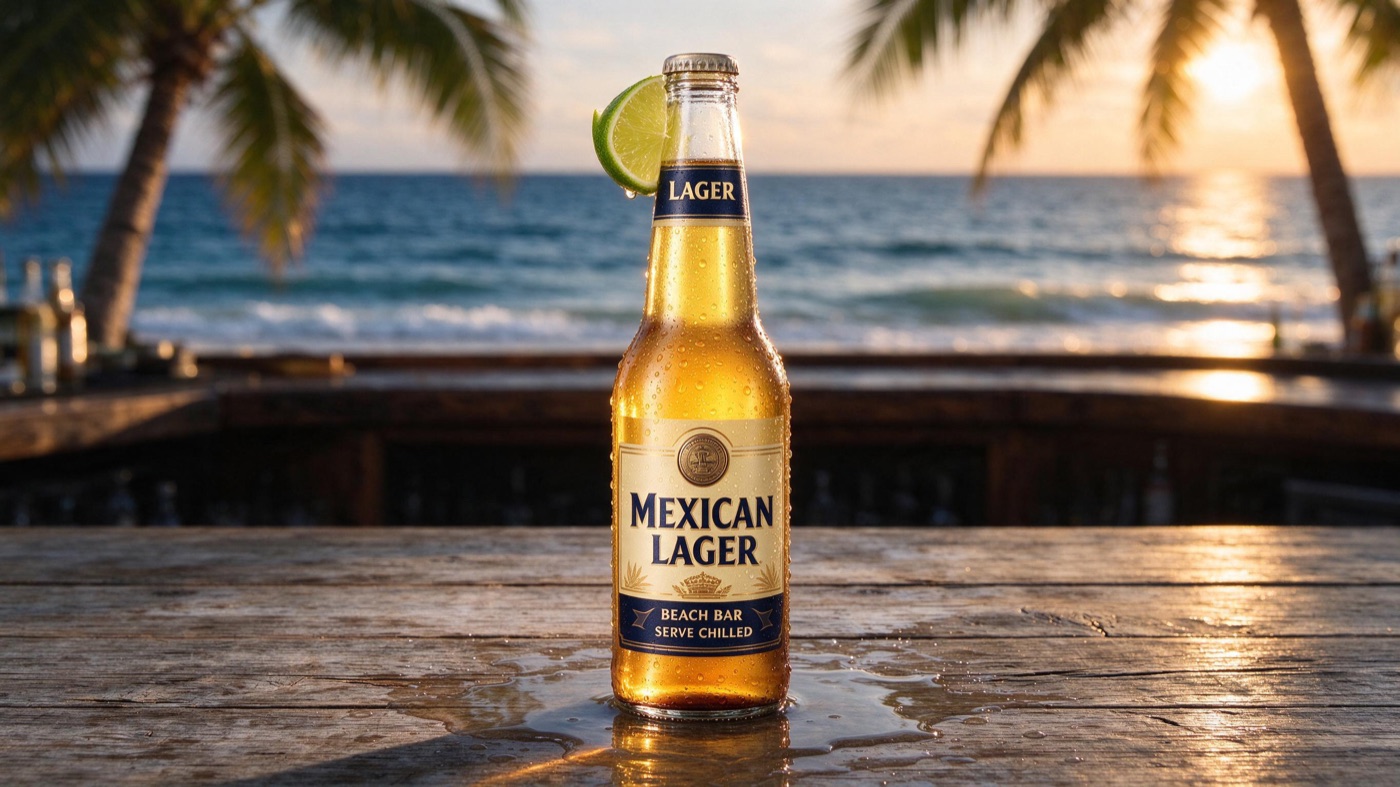
A bright, punchy composition with the sun on the sea behind. The "Mexican Lager — Beach Bar, Serve Chilled" label is spelled correctly but looks generic, and the bottle has a slightly rendered, AI look.
GPT Image 2.5 (medium) — 3.6× cost | 2560×1440 | 28s | ⭐ 7/10
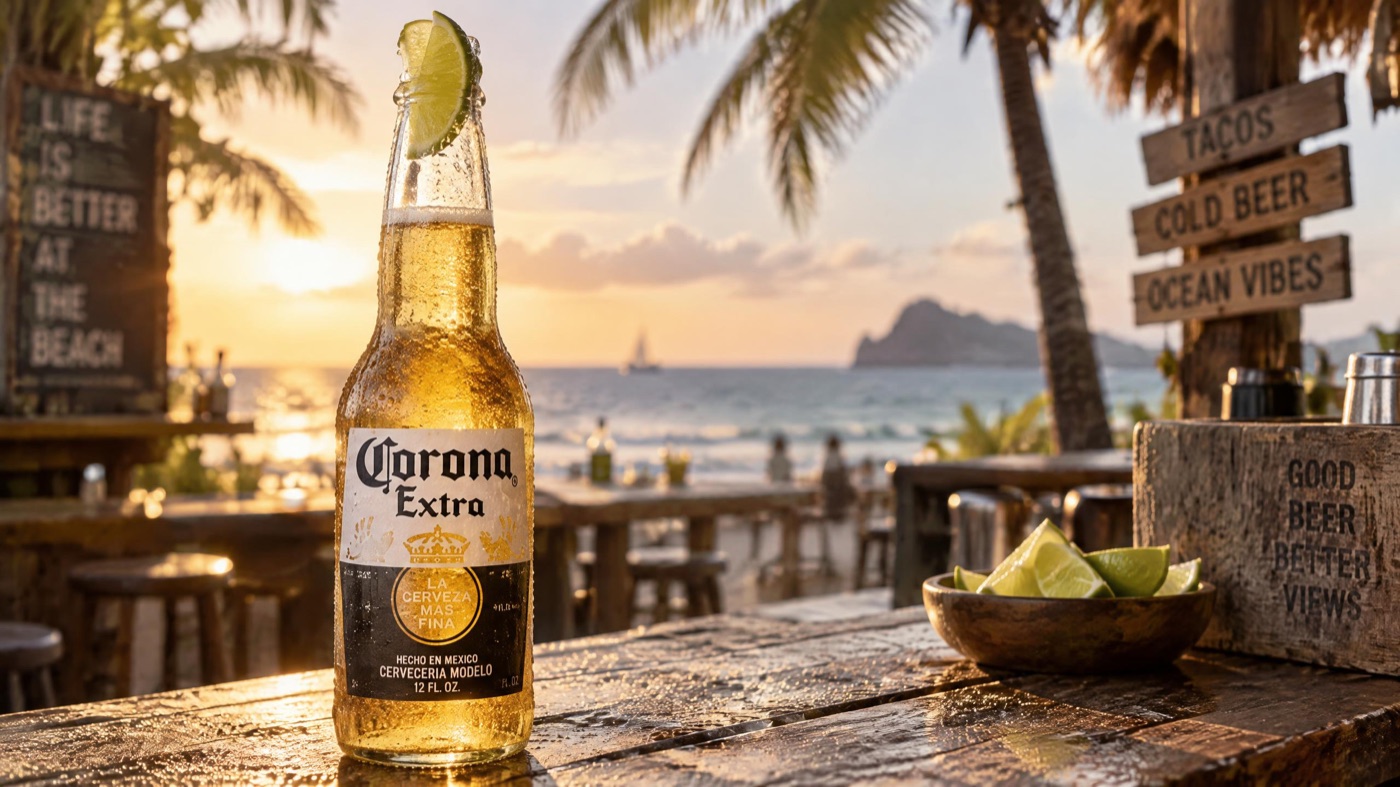
The richest scene, with chalkboard signs, a bowl of limes and a headland on the horizon. It also put a real Corona Extra label on the bottle without being asked. It looks good, but an unprompted real trademark is exactly what you don't want in an ad, and the image has a faintly artificial finish.
Qwen Image 3.0 — 2.7× cost | 2730×1535 | 24s | ⭐ 6.5/10
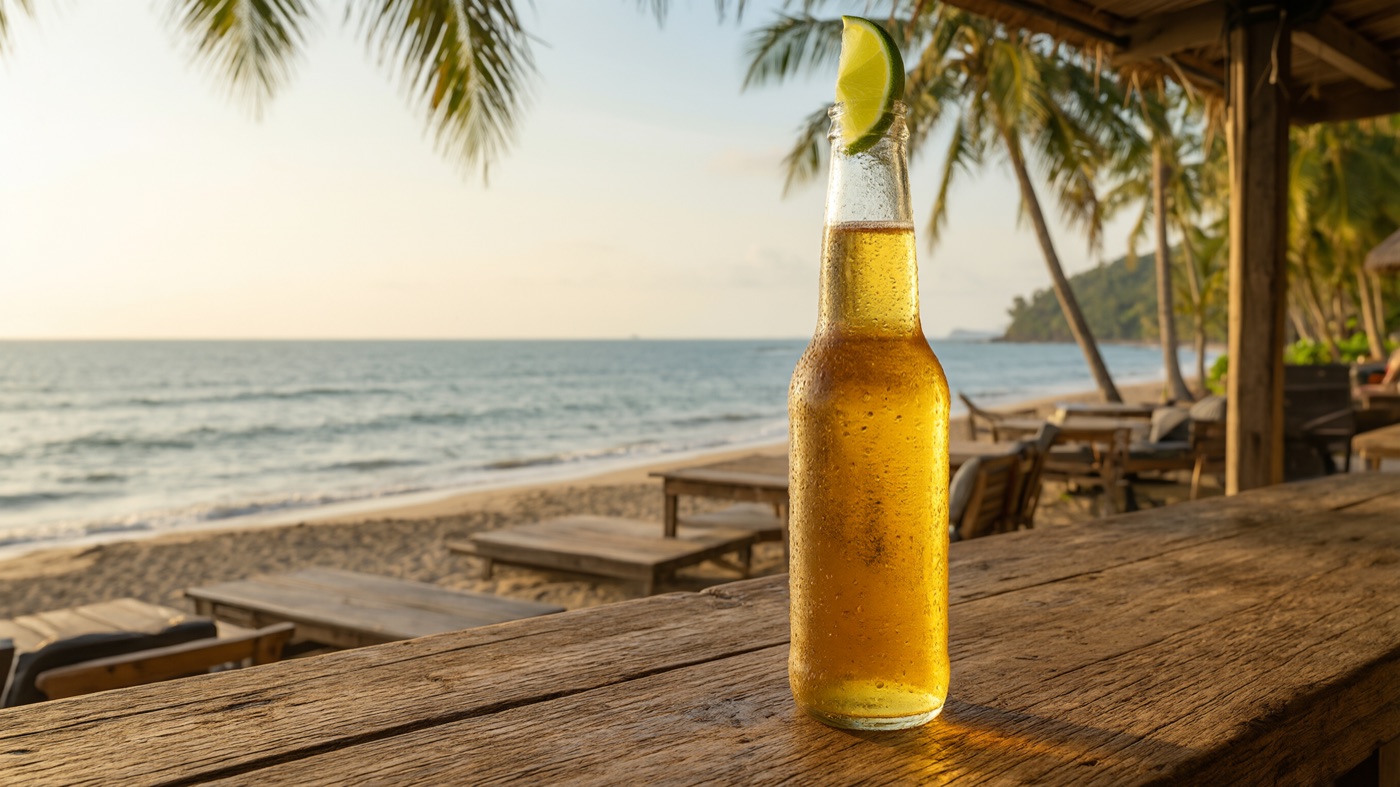
Natural light and a believable beach, but the bottle has no label at all, so it reads as a stock photo rather than a product ad.
Grok Imagine Image 2.0 — 7.3× cost | 2816×1584 | 141s | ⭐ 6/10
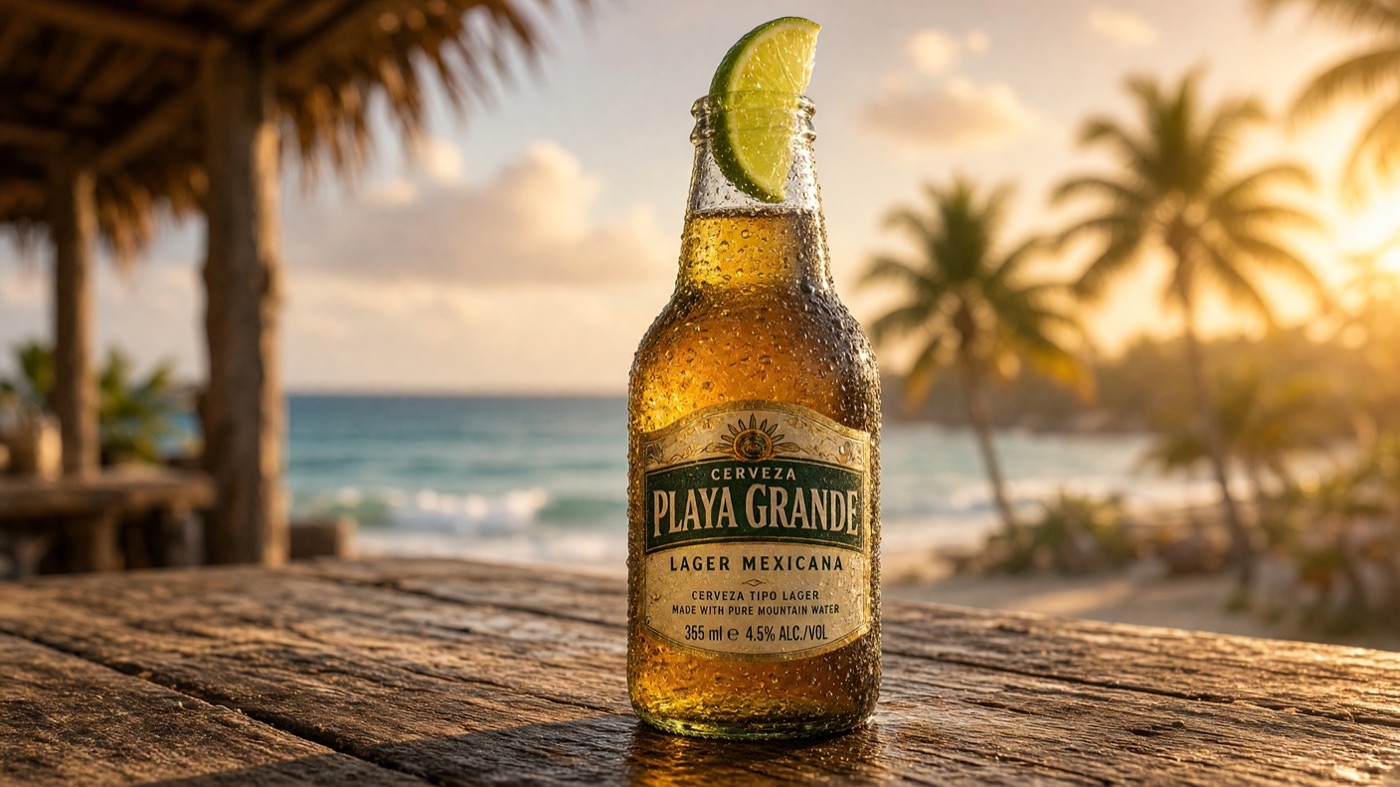
Strong colour and a detailed "Playa Grande" label with fine print, but the condensation is too uniform, like a pattern rather than droplets. It was also by far the slowest model, at well over two minutes.
Seedream v4 — 2.5× cost | 1920×1080 | 10s | ⭐ 5.5/10
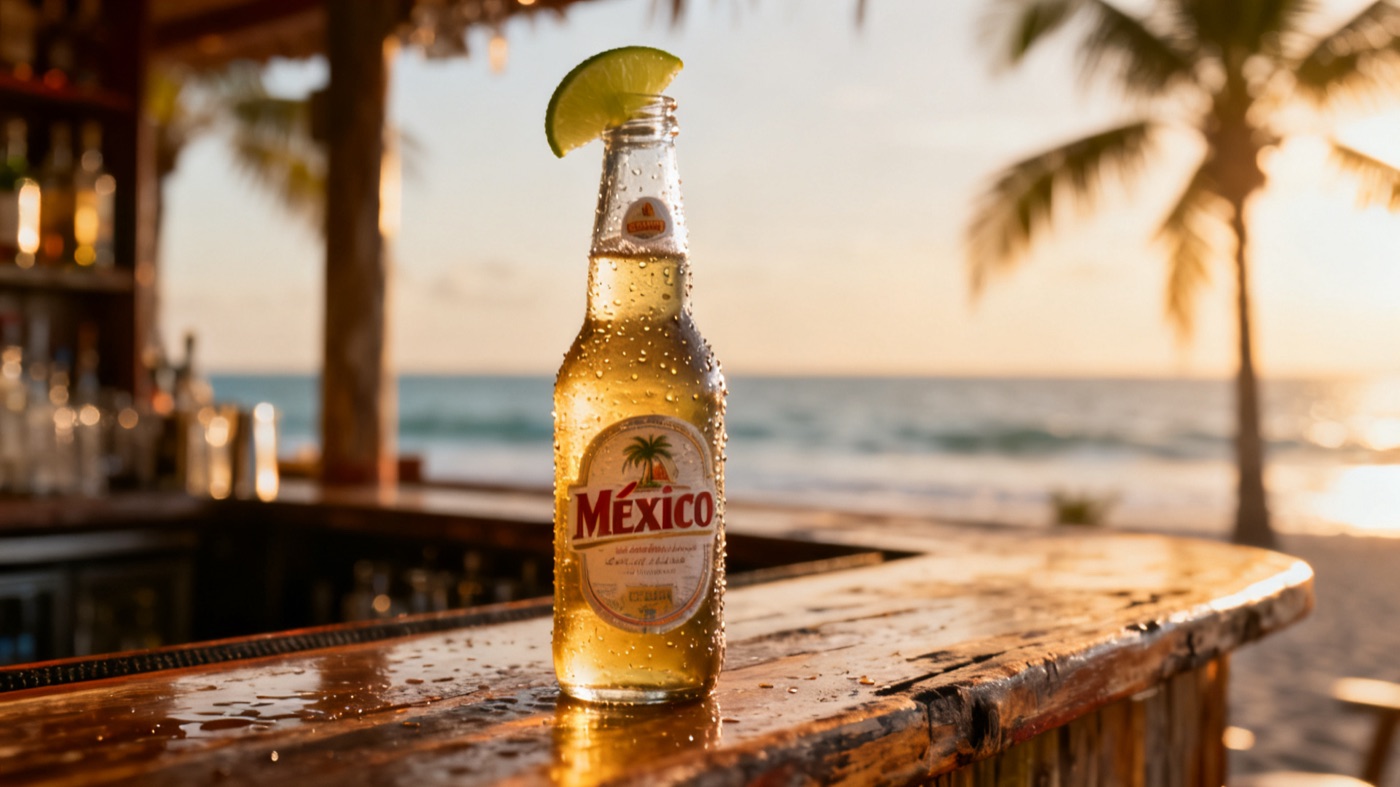
The fastest generation, but it shows its age. The label and droplets look painted on, and the image is noticeably flatter than its successor's at a similar cost.
Test 2: A Slide Illustration With Room for a Title
Presentation slides need a different kind of image: clean, on-brand illustration with a clear empty area where the title will go.
The prompt:
Modern flat vector illustration for a business presentation slide: a small diverse team collaborating around a large floating dashboard with bar charts, a line graph and KPI cards. Clean corporate style, soft blue, teal and white palette, subtle gradients. Keep the left third of the image empty and uncluttered for a slide title.
GPT Image 2.5 (medium) — 3.6× cost | 2560×1440 | 28s | ⭐ 9/10

The most "real product" dashboard, with plausible figures, a growth chart, a product mix and key insights, plus a natural meeting scene. The left third is clean, as asked.
Grok Imagine Image 2.0 — 7.3× cost | 2816×1584 | 110s | ⭐ 9/10
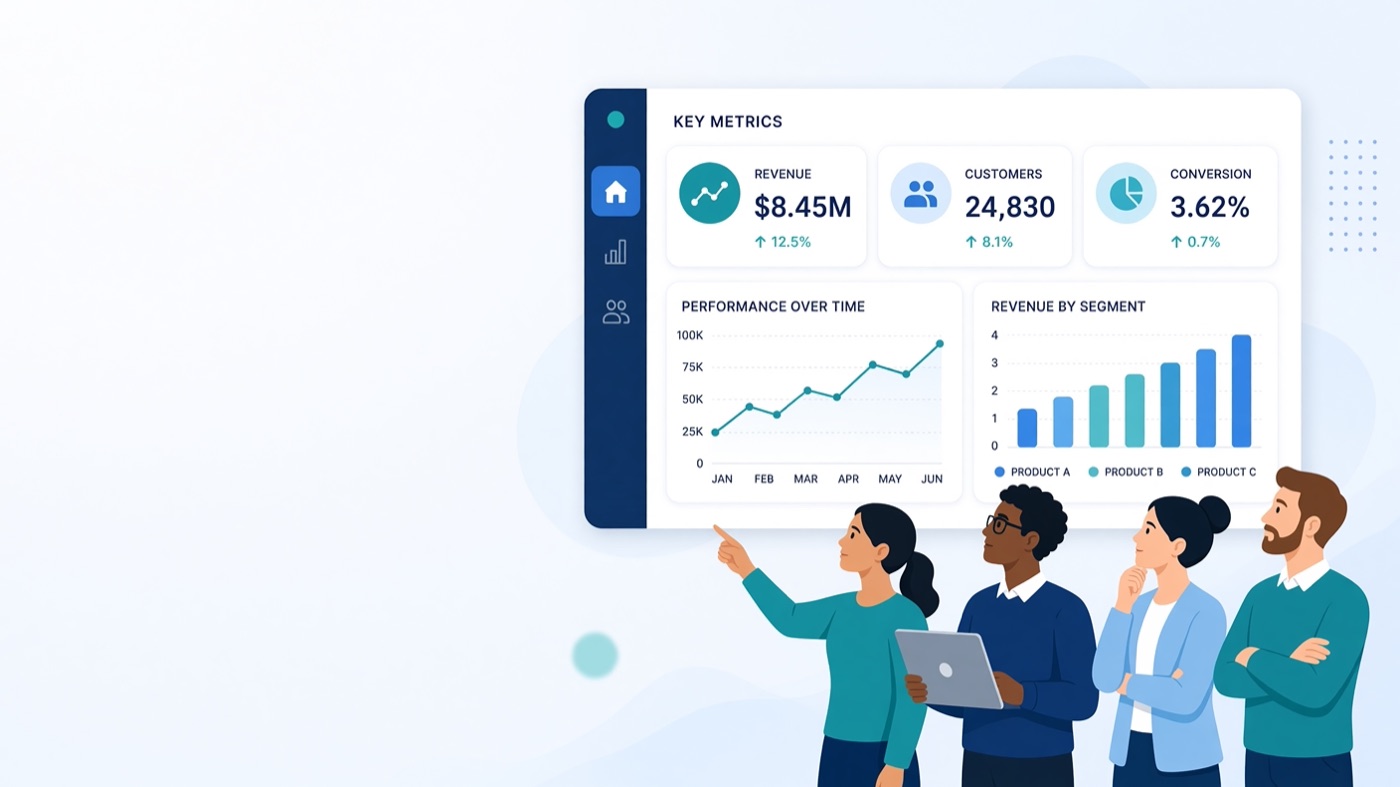
The most detailed dashboard of all, with real axes, labelled segments and tidy KPI cards, and a generous empty area on the left. It looks like it came from a design team, but again it took nearly two minutes.
Meta Muse Image — 1× cost | 2048×1152 | 26s | ⭐ 8.5/10
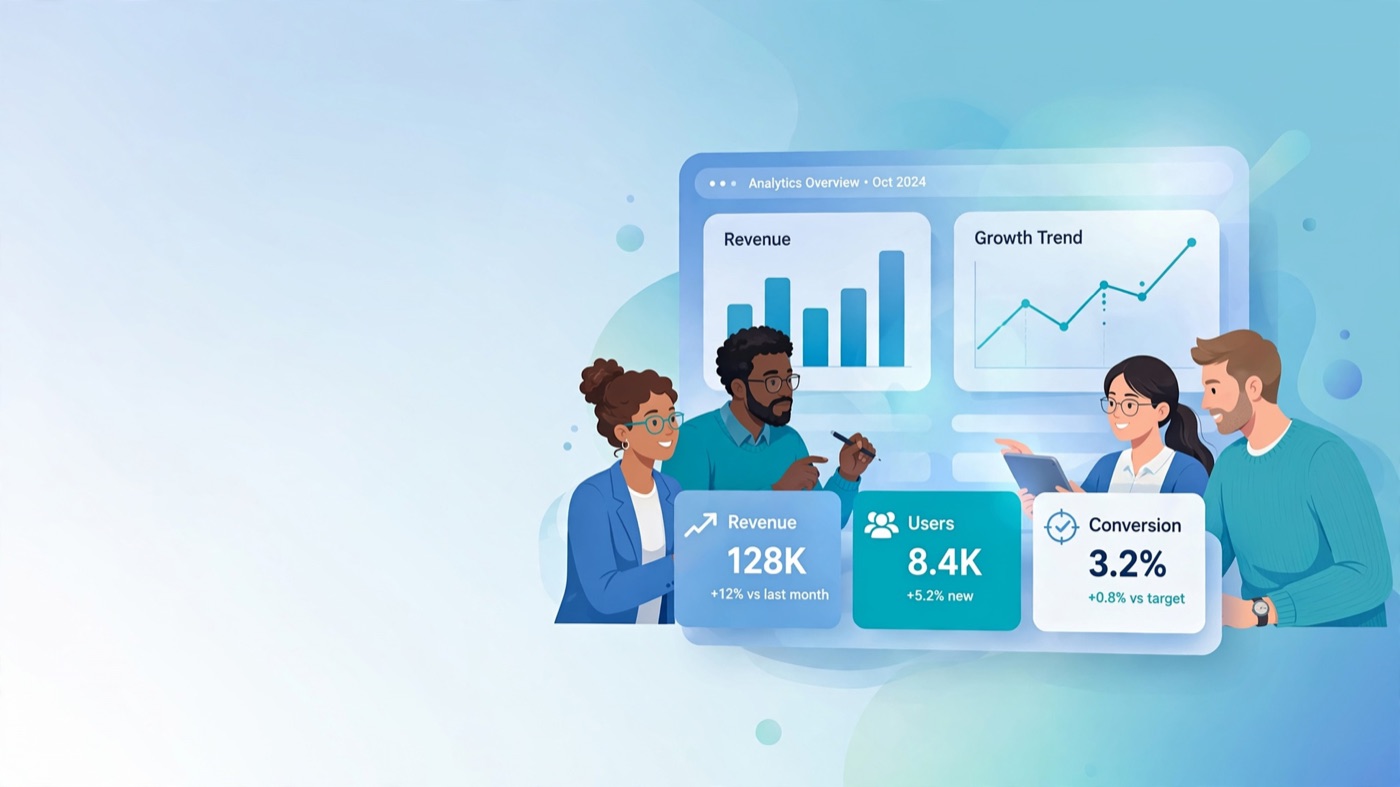
Friendly, well-drawn characters, a floating dashboard with legible KPI cards and a soft gradient background that leaves plenty of room for a title. Exactly what the brief asked for.
Nano Banana 2.1 — 4.9× cost | 2752×1536 | 55s | ⭐ 8.5/10

A stylish, slightly isometric take with a presenter and colleagues around a glowing dashboard. Very polished, with the left of the frame kept open.
Seedream 5.0 Flash — 2.2× cost | 2730×1536 | 21s | ⭐ 7.5/10

Clean and on-palette, with lots of empty space for a title, but the dashboard is mostly placeholder shapes. Fine as a background, less convincing up close.
Seedream v4 — 2.5× cost | 1920×1080 | 11s | ⭐ 6.5/10

On brief, but the least detailed of the usable images, with simple charts and small, generic figures.
Qwen Image 3.0 — 2.7× cost | 2730×1535 | 20s | ⭐ 3/10

The one clear failure. Qwen filled the left third, the area it was asked to keep empty, with a block of garbled Chinese characters. For slides in English, that makes it unusable without editing.
Test 3: A Promo Poster With Exact Text
Text used to be the weak spot of AI images. We asked for three exact lines of copy in a designed layout.
The prompt:
A bold, minimalist promotional poster for a summer fashion sale. Large headline text reading exactly "SUMMER SALE" and below it "50% OFF EVERYTHING", with a small line "This weekend only". Coral, sand and cream colours, a stylised sun and palm leaf shapes, clean modern sans-serif typography, balanced layout.
The headline result: every model spelled all three lines correctly. Text rendering is no longer the differentiator it was a year ago; layout and taste are.
GPT Image 2.5 (medium) — 3.6× cost | 2560×1440 | 26s | ⭐ 9/10
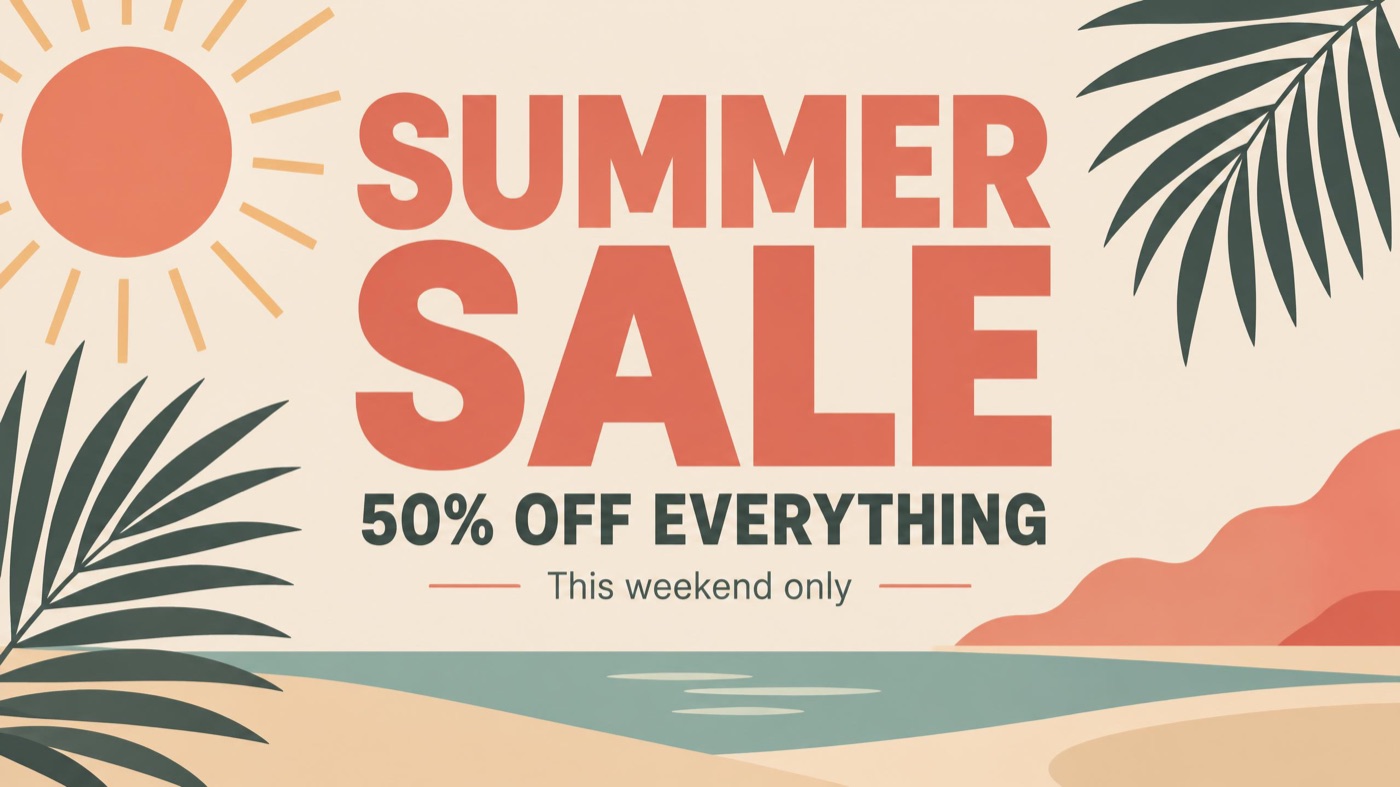
A poster you could print. Strong hierarchy, a heavy sans-serif headline, a beach scene with palms and sea, and the small line set in a clean secondary style.
Grok Imagine Image 2.0 — 7.3× cost | 2816×1584 | 97s | ⭐ 9/10
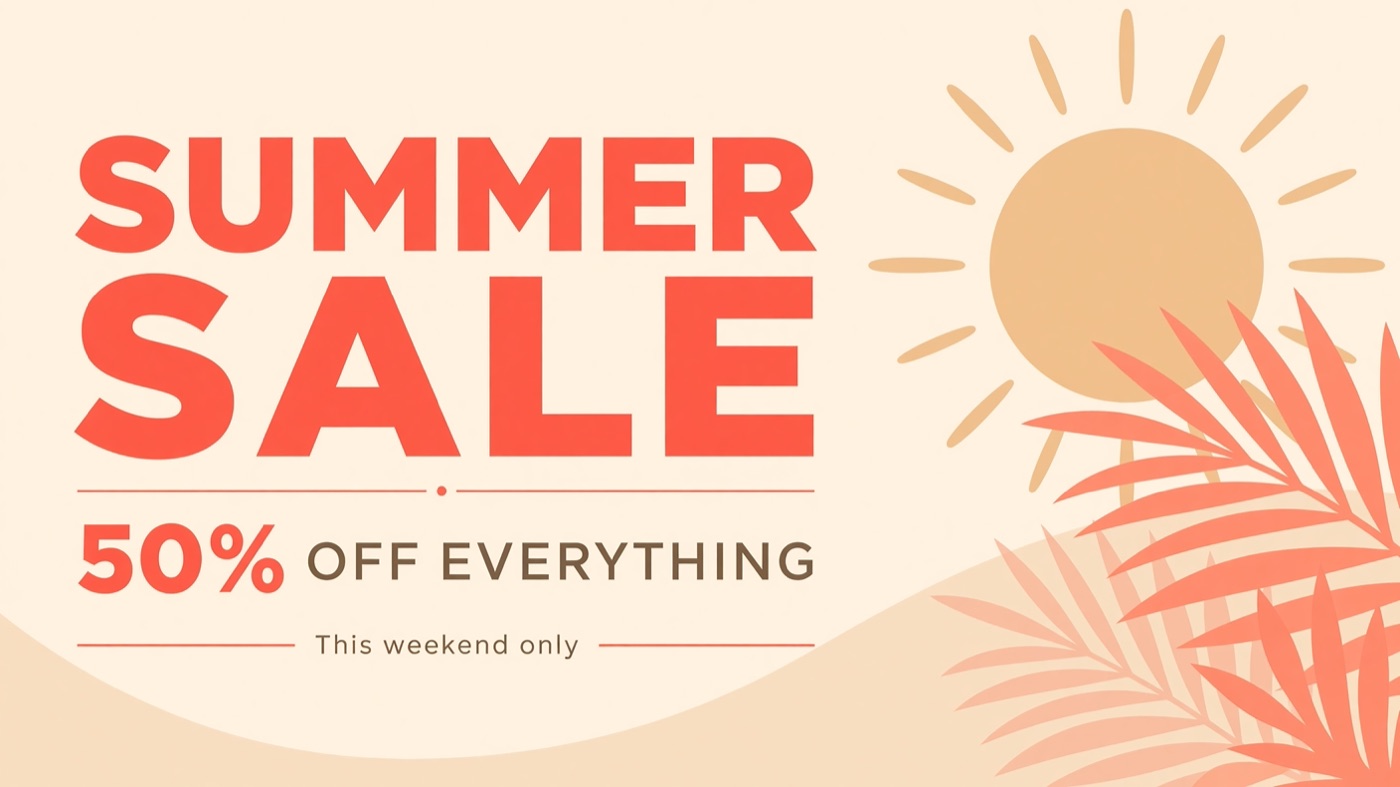
Equally strong. A big coral headline, a split weight on "50% OFF EVERYTHING", thin rules and a large stylised sun with palm leaves. Confident, professional layout.
Meta Muse Image — 1× cost | 2048×1152 | 15s | ⭐ 8/10
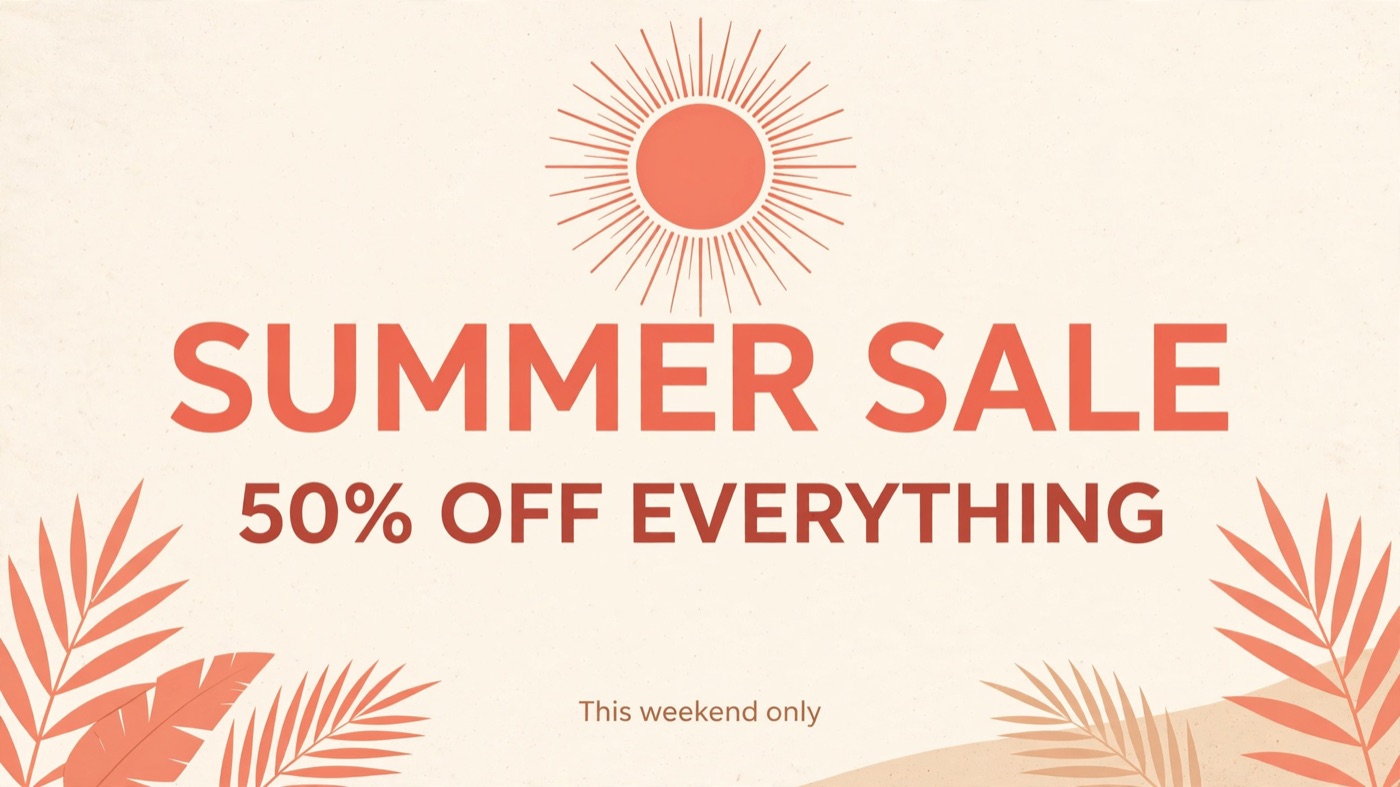
The most literal reading of the brief: centred text, a radiating sun, palm leaves in the corners and exactly the colours requested. Less adventurous than the top two, but clean and correct.
Qwen Image 3.0 — 2.7× cost | 2730×1535 | 20s | ⭐ 7.5/10
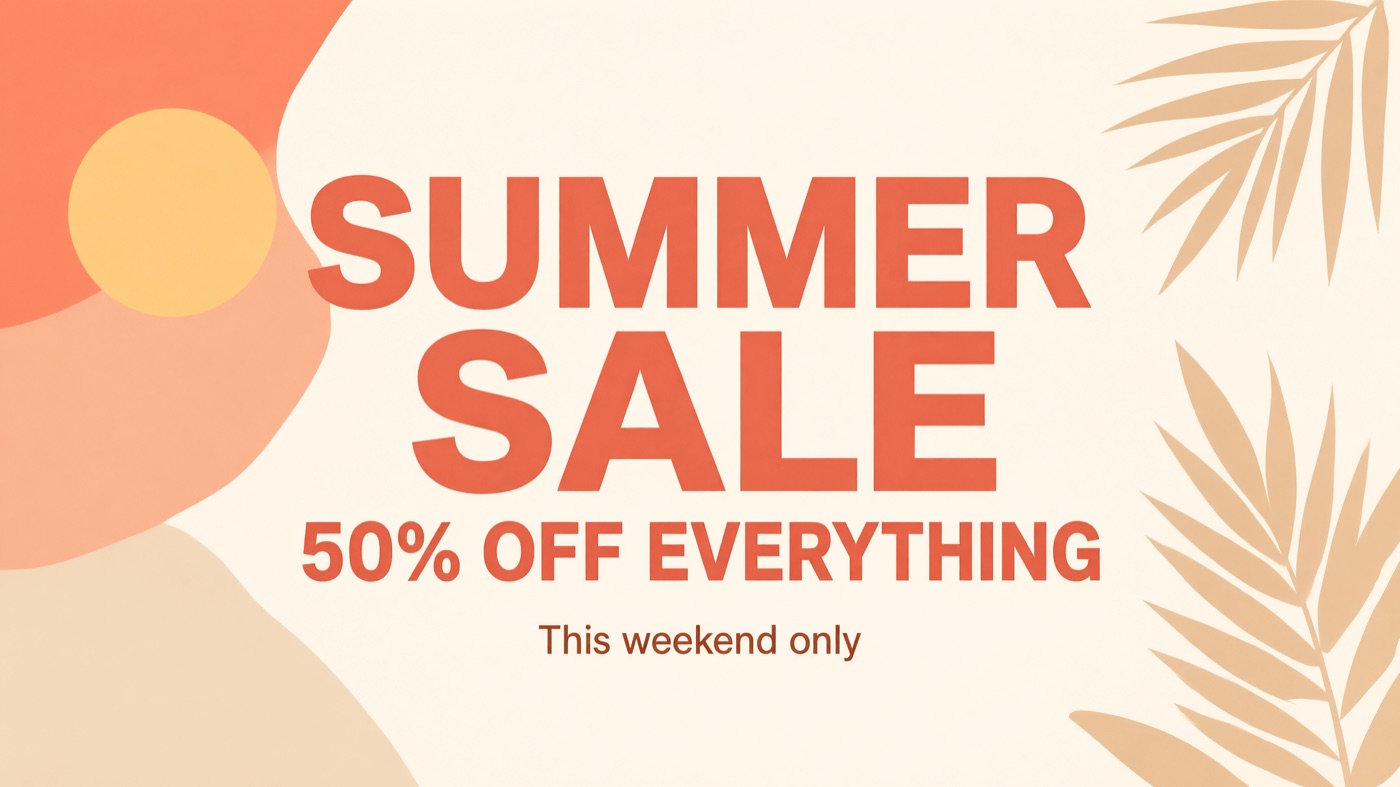
A bold headline over warm abstract shapes and a palm leaf. Tidy, if a little plain.
Nano Banana 2.1 — 4.9× cost | 2752×1536 | 24s | ⭐ 7/10
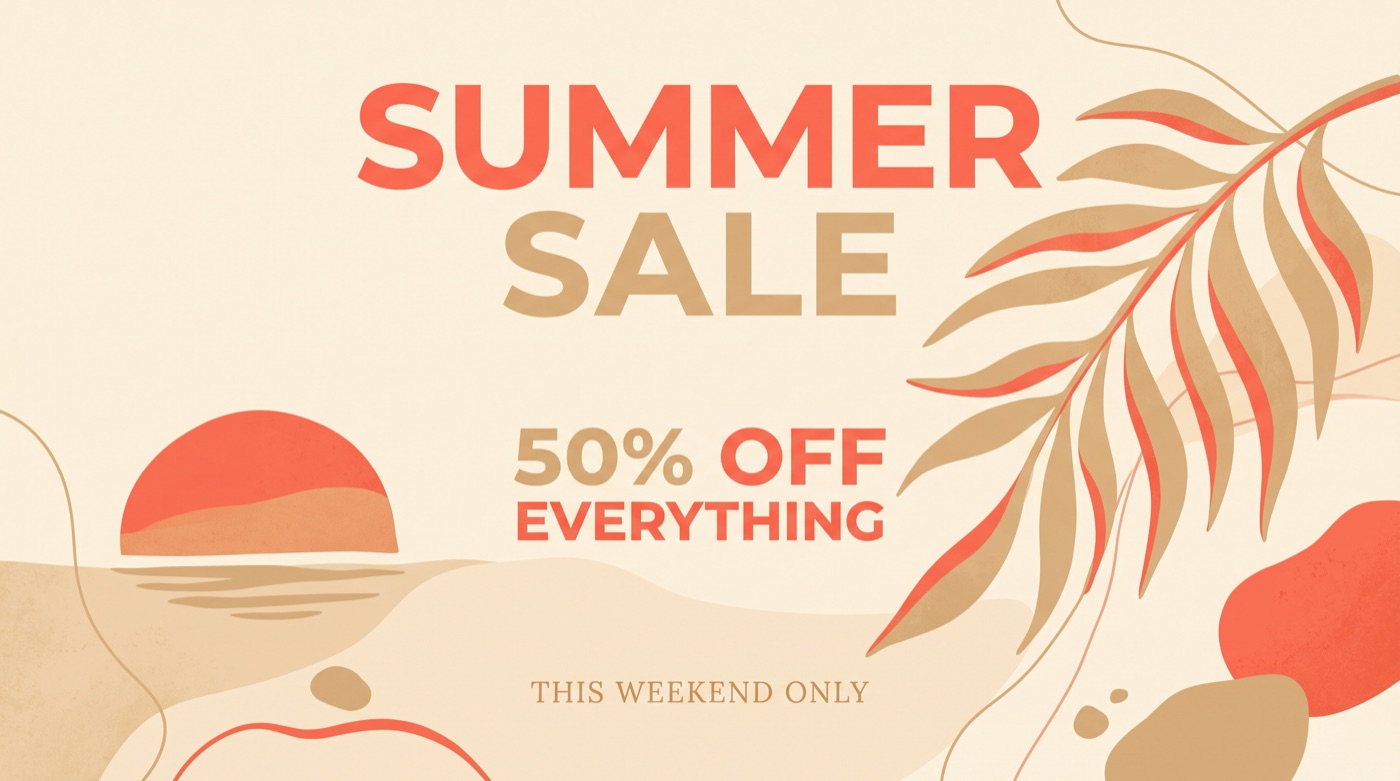
Attractive artwork with a setting sun and a large palm leaf, but it set "This weekend only" in capitals and a serif typeface, ignoring the brief's sans-serif typography.
Seedream v4 — 2.5× cost | 1920×1080 | 11s | ⭐ 7/10
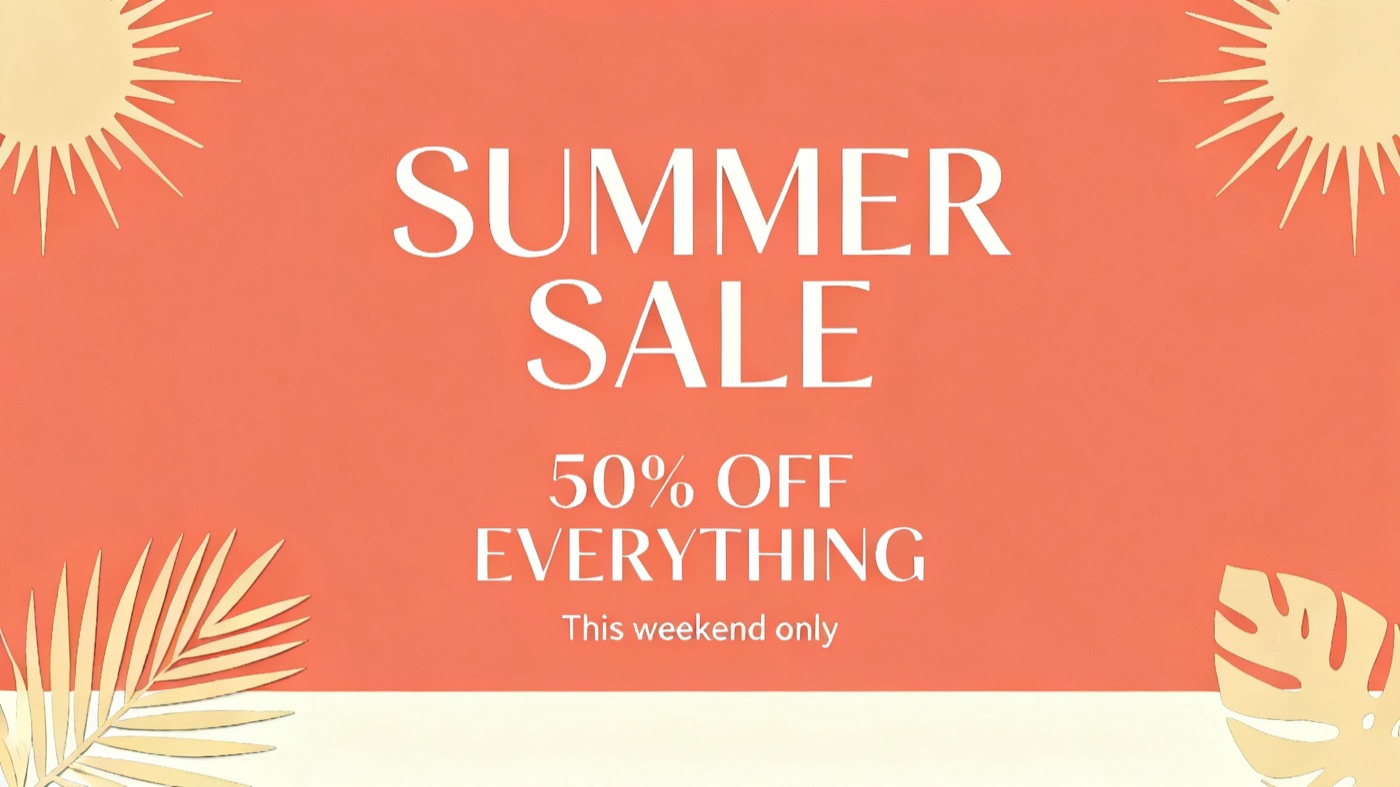
White text on a coral background with paper-cut palm leaves. Elegant, but it used a serif-style typeface where the brief asked for sans-serif.
Seedream 5.0 Flash — 2.2× cost | 2730×1536 | 22s | ⭐ 6.5/10
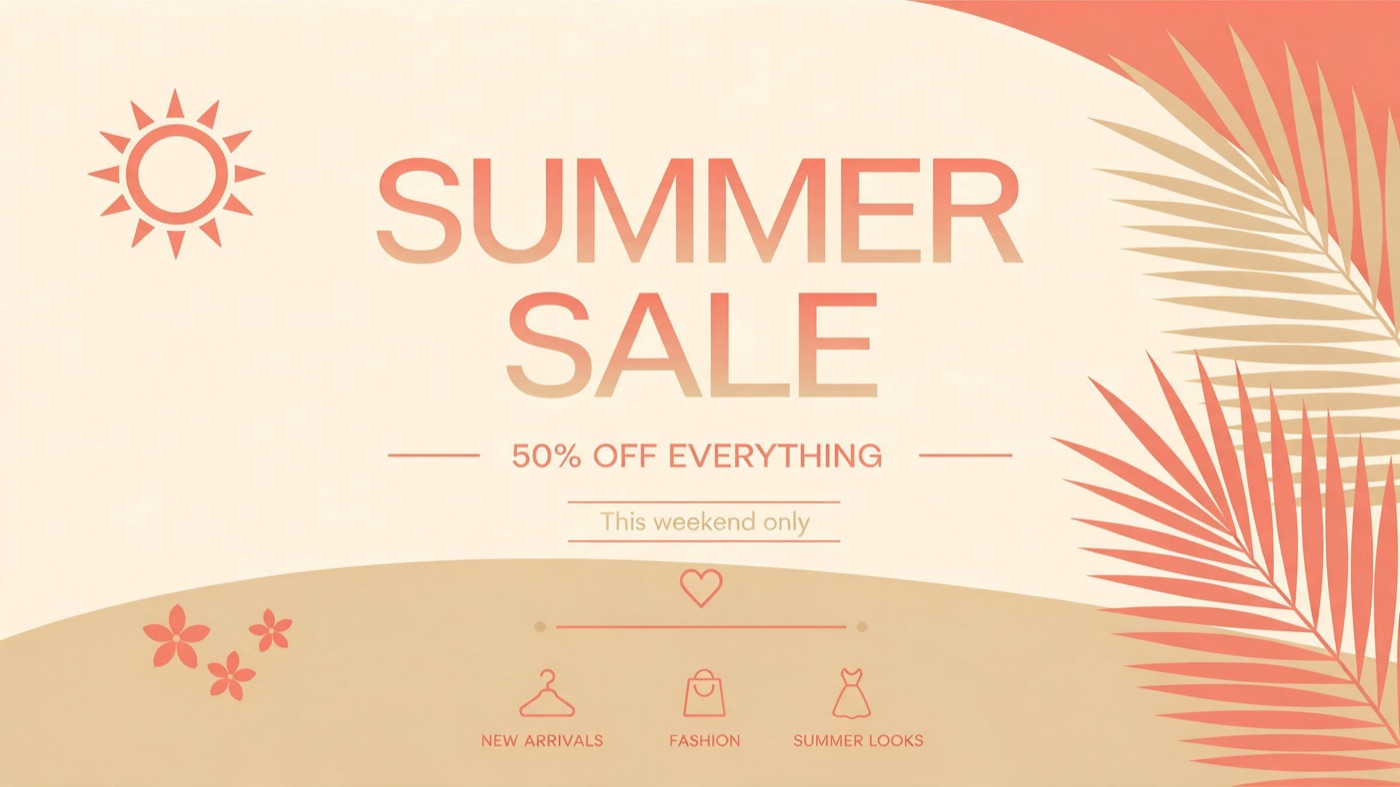
Correct text and a nice palette, but it added copy and icons nobody asked for ("New Arrivals", "Fashion", "Summer Looks"). On a poster, invented text is a real problem.
Test 4: Editing an Image — Day to Night, Beer to Coca-Cola
Editing is where AI images become really practical: change the time of day, swap a product or restyle a scene without starting again. We gave five editing models the same photo, the Muse beer shot from Test 1, and the same instruction.
The instruction:
Change the scene to night time: a dark evening sky, warm string lights and glowing bar lamps, a moody nighttime atmosphere. Replace the beer bottle with a classic glass bottle of Coca-Cola (contour bottle, red label), keeping the same composition, bar top and camera angle.
The original:
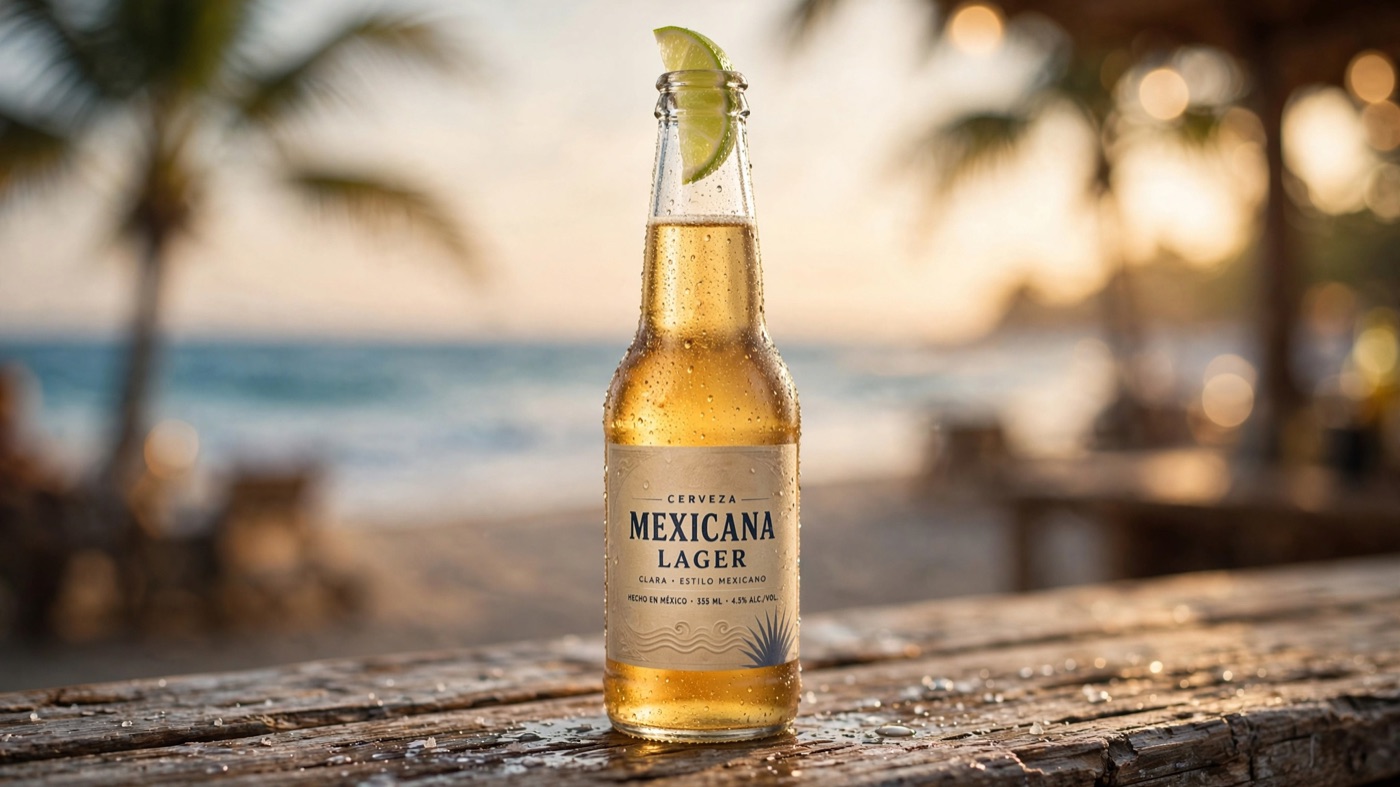
Every model completed both changes. The differences were in how much of the original scene they kept.
Nano Banana 2.1 — 5.1× cost | 2752×1536 | 34s | ⭐ 9/10
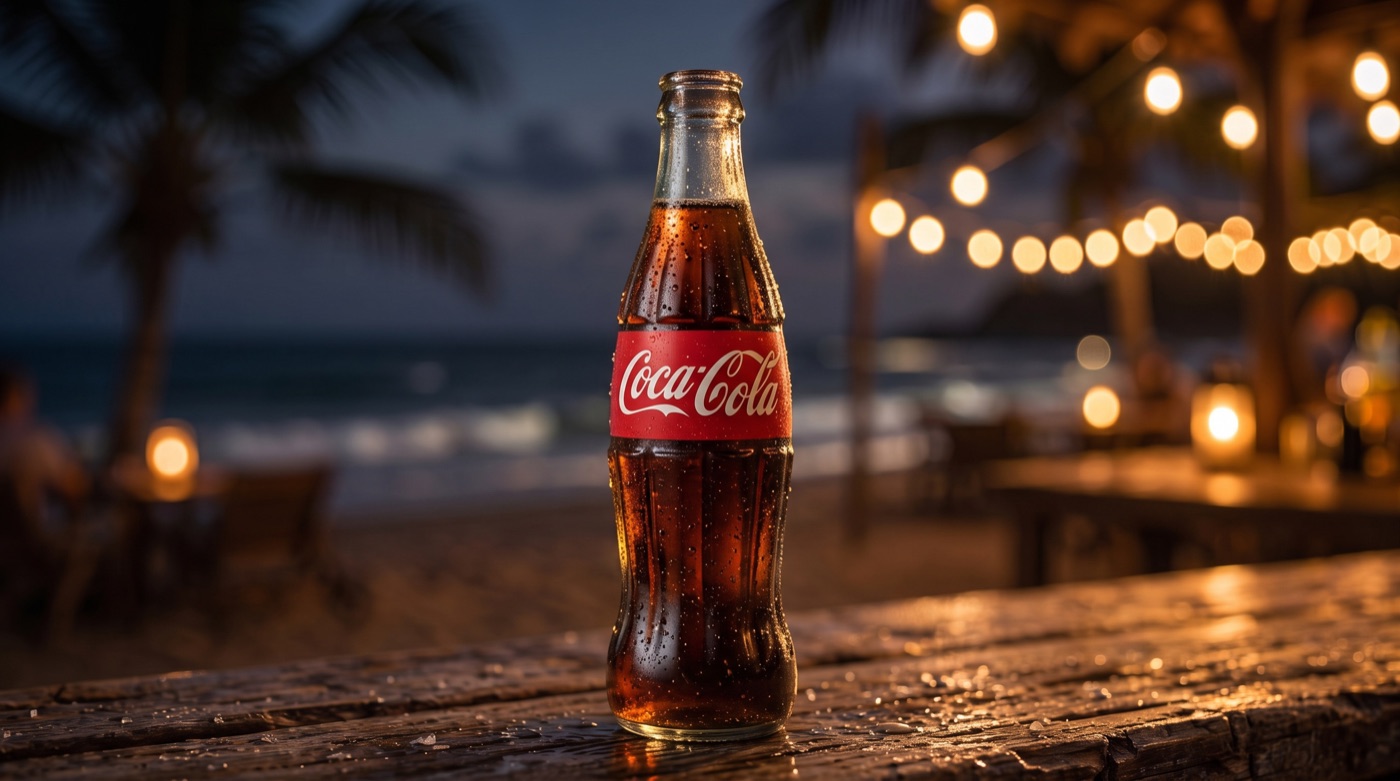
A clean swap and a believable night. String lights glow behind, the bar top and camera angle are unchanged, and the bottle is a convincing contour bottle.
Meta Muse Image — 1× cost | 2048×1152 | 28s | ⭐ 9/10
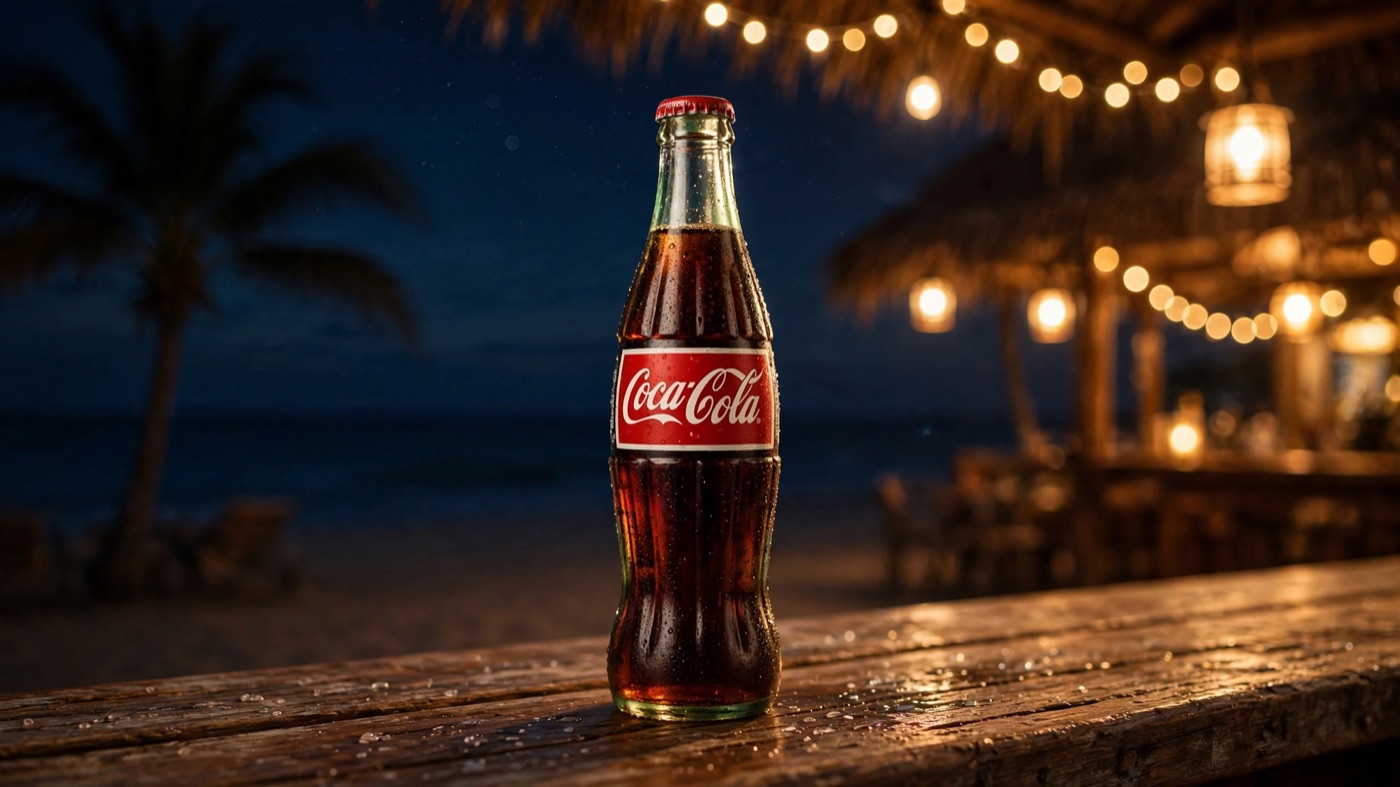
Just as convincing, with a red cap, warm lanterns and the beach huts glowing in the background. It reworked the background slightly more than Nano Banana, but kept the shot recognisably the same.
Seedream 5.0 Flash — 2.2× cost | 2730×1536 | 21s | ⭐ 8.5/10
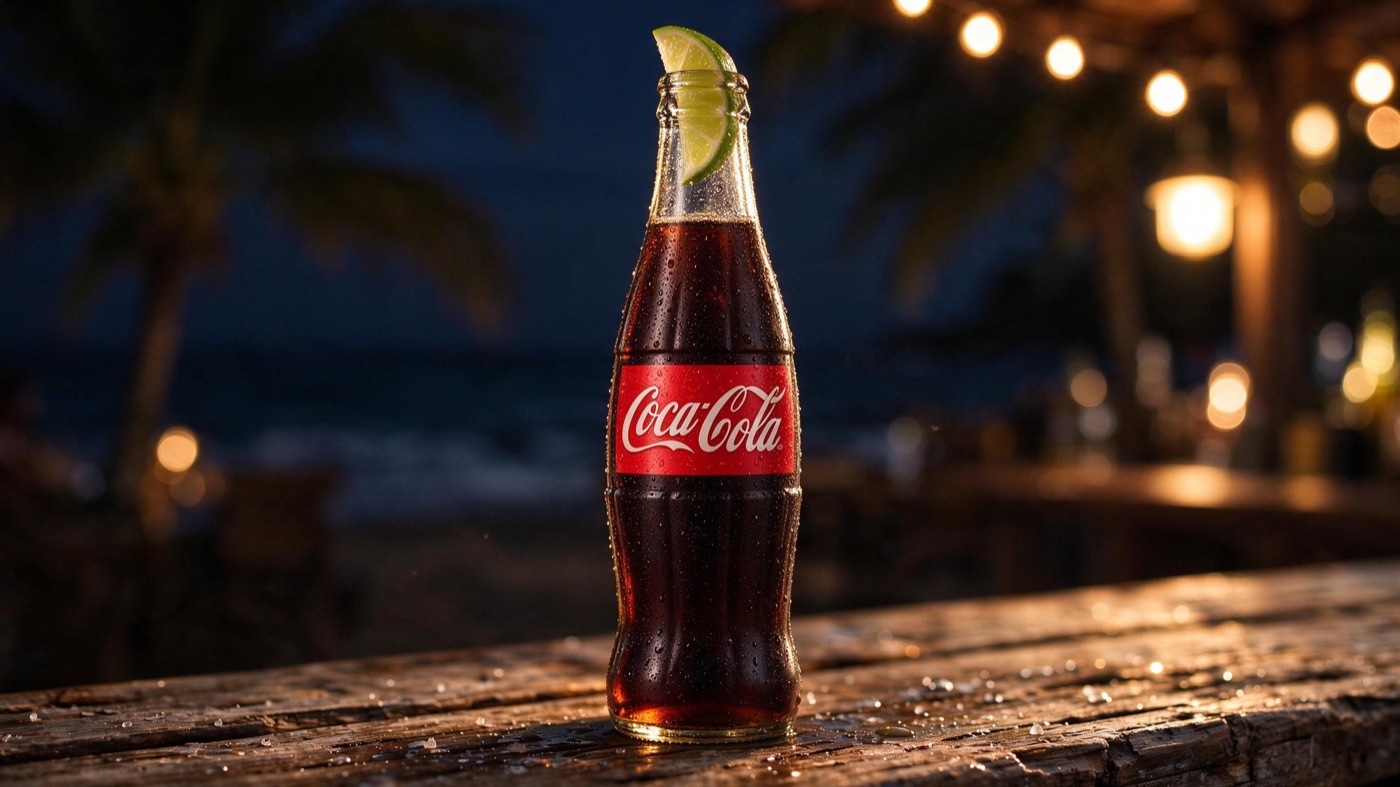
The most faithful to the original framing, almost pixel for pixel, but it kept the lime wedge from the beer in the neck of the Coca-Cola bottle, which looks odd. Being too literal is a real failure mode for editors.
GPT Image 2.5 (medium) — 5.0× cost | 2560×1440 | 32s | ⭐ 7.5/10
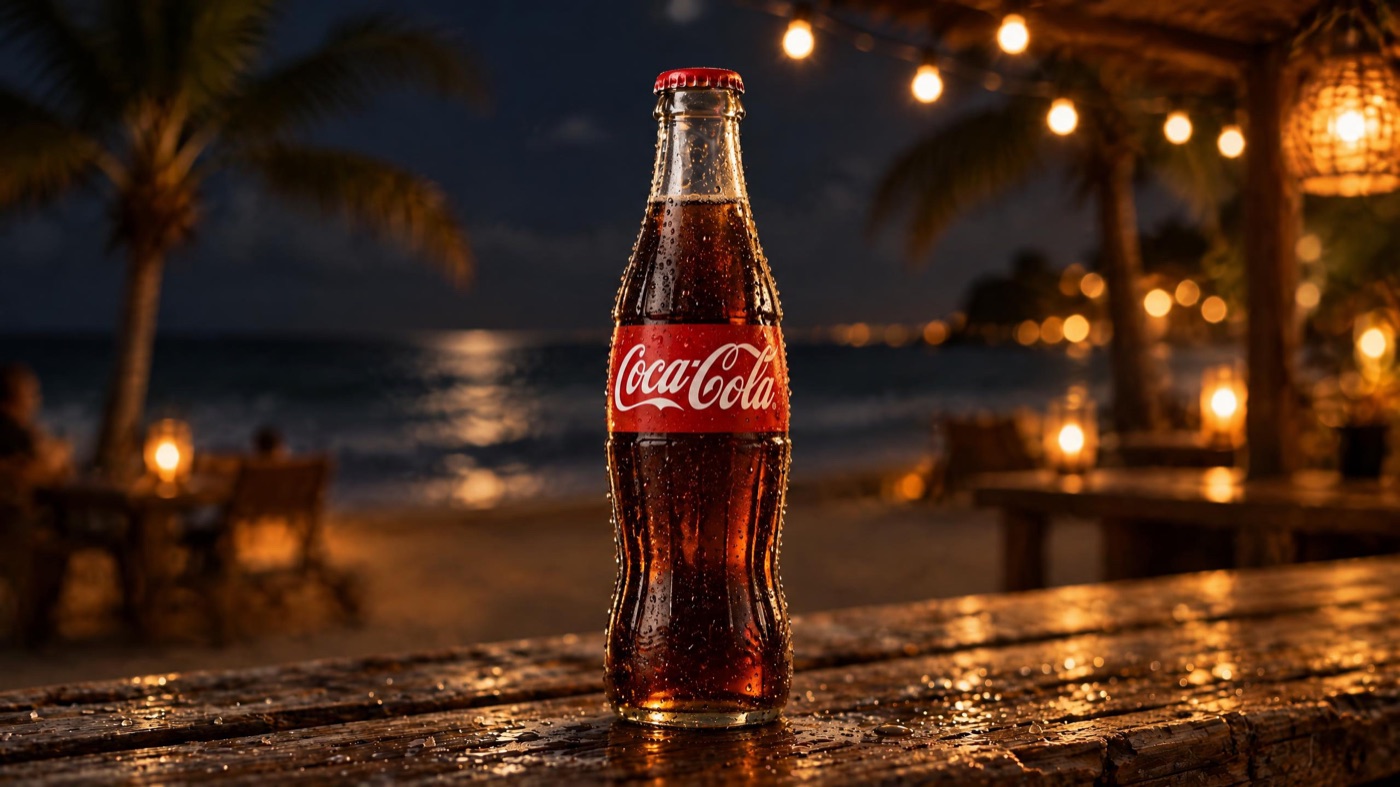
The most dramatic result, with wet reflections and moonlight on the sea, and a strong product shot. But it restyled more of the scene than we asked for.
Seedream v4 — 2.5× cost | 2048×1152 | 41s | ⭐ 6.5/10
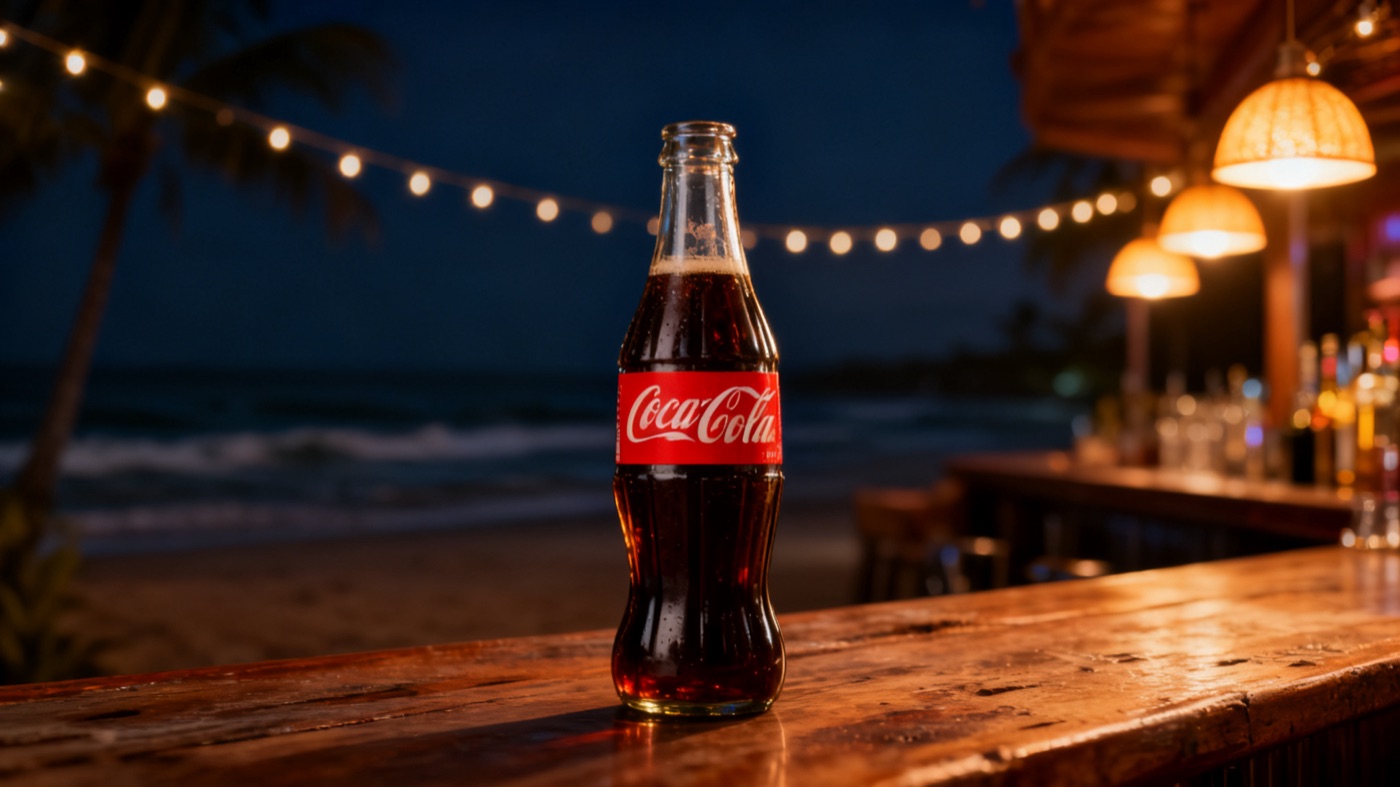
It changed the most. A new bar counter with shelves of bottles and hanging lamps replaced the weathered bar top, and the bottle shrank. Fine as a new image, not as an edit.
Brand names are used here purely for testing. Animax isn't affiliated with The Coca-Cola Company or with Corona.
Overall Results
Image generation
| Model | Beer ad | Slide | Poster | Average | Relative cost | Output (16:9) | Typical speed |
|---|---|---|---|---|---|---|---|
| Meta Muse Image | 9 | 8.5 | 8 | 8.5 | 1× | 2048×1152 | 15–26s |
| GPT Image 2.5 (medium) | 7 | 9 | 9 | 8.3 | 3.6× | 2560×1440 | 26–28s |
| Nano Banana 2.1 | 9 | 8.5 | 7 | 8.2 | 4.9× | 2752×1536 | 24–55s |
| Grok Imagine Image 2.0 | 6 | 9 | 9 | 8.0 | 7.3× | 2816×1584 | 97–141s |
| Seedream 5.0 Flash | 7.5 | 7.5 | 6.5 | 7.2 | 2.2× | 2730×1536 | 19–22s |
| Seedream v4 | 5.5 | 6.5 | 7 | 6.3 | 2.5× | 1920×1080 | 10–11s |
| Qwen Image 3.0 | 6.5 | 3 | 7.5 | 5.7 | 2.7× | 2730×1535 | 20–24s |
Image editing
| Model | Score | Relative cost | Speed |
|---|---|---|---|
| Nano Banana 2.1 | 9 | 5.1× | 34s |
| Meta Muse Image | 9 | 1× | 28s |
| Seedream 5.0 Flash | 8.5 | 2.2× | 21s |
| GPT Image 2.5 (medium) | 7.5 | 5.0× | 32s |
| Seedream v4 | 6.5 | 2.5× | 41s |
One more number puts this in perspective: GPT Image 2.5 at the maximum quality setting that tops the public leaderboards costs about 55× the cheapest model per image. For most marketing and presentation work, the medium setting we tested is the sensible choice.
Which AI Image Model Should You Use?
- Best value: Meta Muse Image. The highest average score in our test at the lowest cost, with strong results across ads, slides, posters and editing. Hard to beat for everyday work.
- Best photorealism and editing: Nano Banana 2.1. The most cinematic product shot and the cleanest edit, at about five times the cost of Muse.
- Best for text-heavy designs: GPT Image 2.5. Joint best on the poster and the slide. Watch for unprompted real brands in product shots.
- Grok Imagine Image 2.0 matched GPT on layout and detail, but it was the slowest and most expensive model by a wide margin.
- Seedream 5.0 Flash is a solid budget option and a clear step up from Seedream v4, which this generation has overtaken.
- Qwen Image 3.0 is capable, but its garbled text in the slide test makes it risky for anything containing words.
The bigger lesson is the same one our video tests taught us: leaderboards are a starting point, not an answer. The leaderboard leader, GPT Image 2.5 at maximum quality, is dramatically more expensive than the models that won our real-world briefs, and one well-ranked model failed a basic slide layout.
Tips for Prompting AI Images for Videos and Slides
- Describe the frame, not just the subject. Say where empty space should go ("keep the left third empty for a title") and the models will usually respect it.
- Put exact text in quotes. All seven models rendered quoted copy correctly. Also say what not to add, or some models invent extra text.
- Name the style of label or brand you want, not a real one. Ask for "an invented craft-beer label" rather than leaving it open, and you avoid real trademarks appearing.
- Match the aspect ratio to your video. Generate in 16:9 for landscape videos and slides, and 9:16 for Reels, Shorts and TikTok, so nothing gets cropped.
- For edits, say what must stay the same. "Keeping the same composition, bar top and camera angle" made the difference between a faithful edit and a new image.
Conclusion
AI image generation has quietly crossed a line. Text renders correctly, product shots look like a studio made them, and edits can change the time of day and the product in one sentence. The differences between the best models are now about style, speed and cost rather than whether they work at all.
In our tests, Meta Muse Image delivered the best results per credit, Nano Banana 2.1 produced the most cinematic photography and the cleanest edit, and GPT Image 2.5 led on text-heavy design. Choose by the kind of image you make most, and you'll get better results for less.
About Animax.ai
Animax.ai is an all-in-one video creation platform for content creators, marketers and businesses, and AI images are built into it. You can:
- Generate images from a prompt on the AI Image screen, at the exact size of your video.
- Edit any image on your canvas with a plain-language instruction. Right-click it and describe the change.
- Ask the Animax AI assistant for an illustration, a product shot or a new slide, and it creates and places the image for you.
- Turn images into video, with AI clips, animated slides, voiceover and music in the same project.
The image models in Animax are chosen through tests like this one, so you get strong results without paying for quality you don't need.
Try it at animax.ai.
Get Animax updates
New features, improvements, and fixes — delivered straight to your inbox. No spam, unsubscribe any time.